Do you want to draw and paint like a real digital artist on your iPhone or iPad? Then Download and Install Adobe Fresco iPA — a free drawing and painting app that gives you thousands of brushes, unlimited layers, animation tools, and so much more, completely free on your iPhone and iPad with Apple Pencil Pro support.
What is Adobe Fresco?
Adobe Fresco is a powerful free drawing and painting app built specially for iPad and iPhone users. It works really well with Apple Pencil Pro. So whether you are a beginner or a pro artist, this app gives you all the tools you need to create your next masterpiece right from your device.
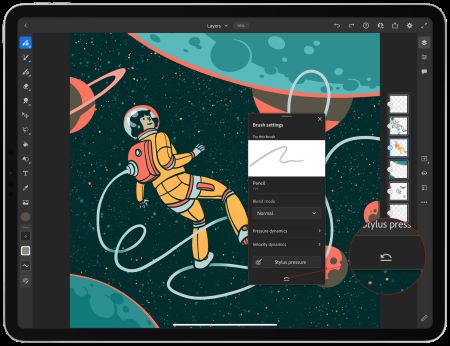
Moreover, The best part is that your brushes and projects follow you across all your devices. That means you can start drawing on your iPad and keep going on your iPhone without any problem at all. Also, Fresco connects directly with Photoshop and Illustrator, so your work never gets stuck in one place.
Adobe Fresco App Features:
- Brush variety — Paint with thousands of pixel brushes, vector brushes, and exclusive Live Brushes. You can also import your favorite Photoshop brushes as .abr files.
- Unlimited layers — Create like a pro and discover endless possibilities with unlimited layers inside the app.
- Symmetry tools — Draw stunning symmetrical artwork quickly and easily with new reflective and rotational guides.
- Snap to shape — Hold down at the end of your stroke to snap a perfect circle, polygon, line, or arc into place.
- Paint inside mode — Speed up your coloring by keeping your brush strokes inside your line art only.
- Color palettes — Fresco automatically creates a color palette whenever you import any artwork.
- Recolor your artwork — Easily test and apply changes to brightness, hue, saturation, and color balance just like Photoshop.
- Text tool — Add stylish text to your artwork using Adobe’s big collection of free fonts.
- Multicolor swatches — Pick up colors from any artwork and paint with multiple colors at once.
- Motion tools — Add animation to your artwork using frame-by-frame animation or motion paths to create a GIF or MP4 video file.
- Time-lapse export — Export a video that replays your entire artwork creation from start to finish.
- Magic wand, liquify and free transform — Select and change any object in your artwork easily and fast.
- Step-by-step tutorials — Learn new skills with built-in video tutorials and the Fresco Community.
- Drawing aids — Trace edges of a ruler, circle, square, or polygon. And fill inside or outside shapes with the Fill tool.
- Guides and grids — Align your artwork and create perspective grids from an imported photo.
- Easy sharing — Export your artwork in PNG, JPG, and layered PSD file formats.
- Seamless integration — Open and send your layered documents directly to Photoshop or Illustrator on desktop and iPad without any importing or exporting.
Adobe Fresco is completely safe to use and does not bring any malware or virus to your iPhone or iPad device. So just tap the Download button above, install the app, and start creating amazing digital artwork on your iPhone or iPad for free.
Thank’s for visiting iPA Apps